How to Describe a Chart Aloud Without Reading Every Number

“As you can see, the blue line is better” gives an audience very little information. A listener may not see the slide, distinguish the colours, remember the units, or know what “better” means. A useful chart description names the measure and the comparison before interpreting the result.
You do not need to recite every number in a long dataset. You do need to communicate the information that matters to the explanation and provide access to the exact data when that is part of the audience’s task. This guide turns one original illustrative chart into a spoken script you can adapt.
Begin with the data and the purpose
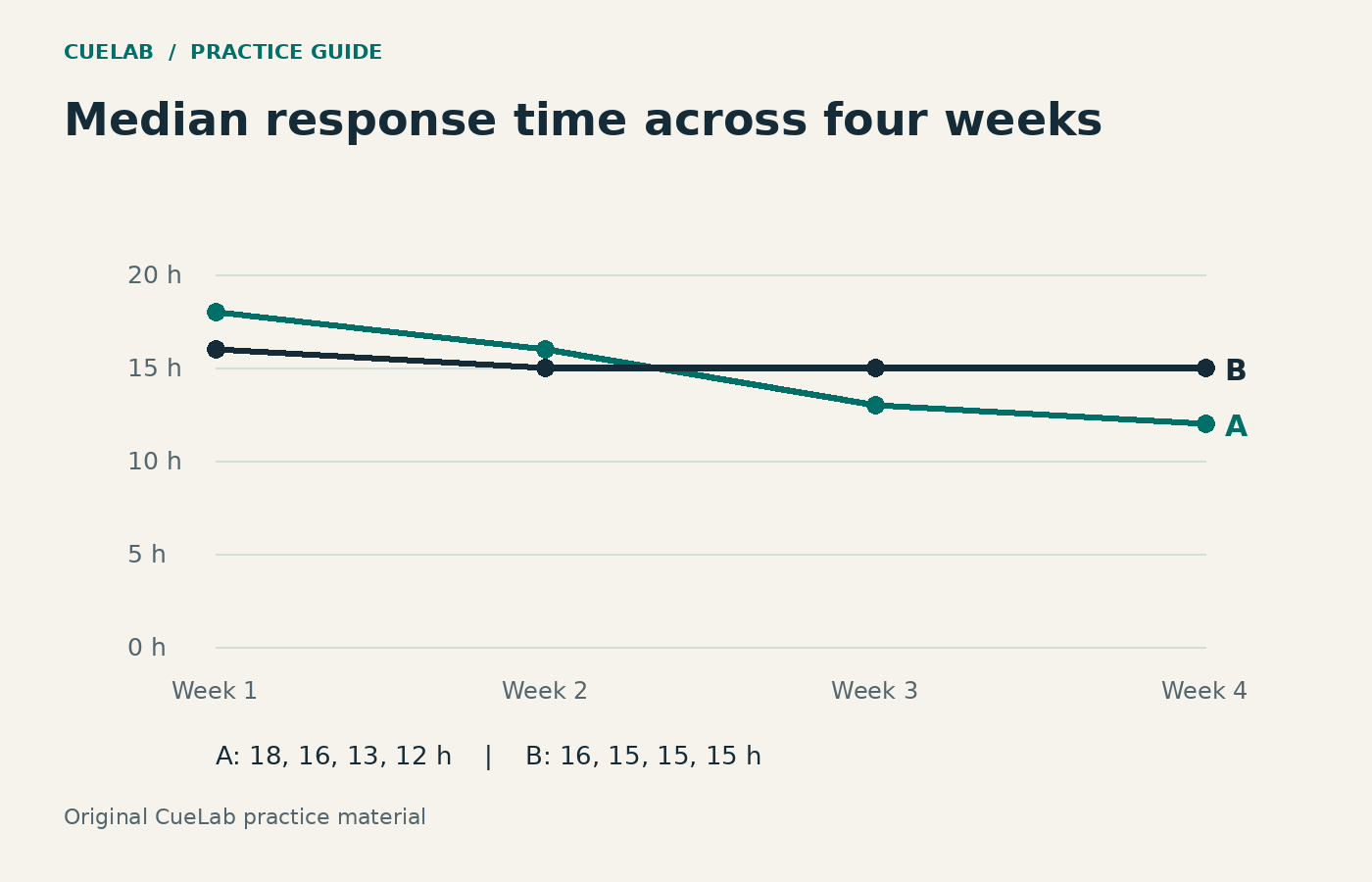
Our fictional chart shows median response time for ordinary support enquiries across four weeks. Team A moves from 18 to 12 hours; Team B moves from 16 to 15. The purpose is to describe how the recorded medians changed, not to establish why they changed or declare that all customers received faster answers.
| Week | Team A | Team B |
|---|---|---|
| 1 | 18 | 16 |
| 2 | 16 | 15 |
| 3 | 13 | 15 |
| 4 | 12 | 15 |
The numbers are invented for this explanation exercise. “Median” means the middle response time when the observations are ordered; it is not the same as a maximum or a mean. That definition matters because an audience could otherwise assume the chart describes every enquiry.
Use a five-part spoken route
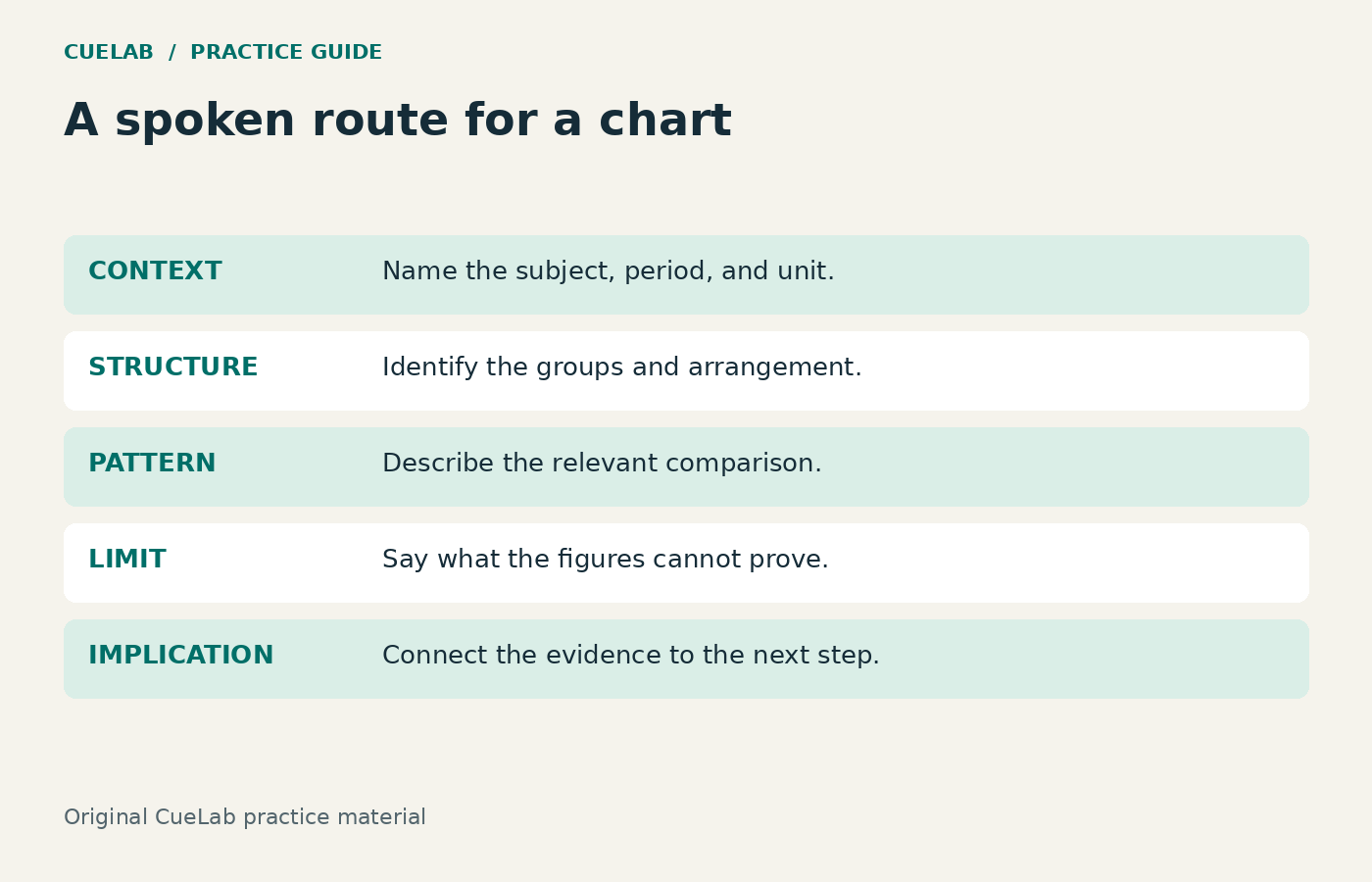
The route is context, structure, pattern, exception or limit, implication. Context identifies the subject and unit. Structure explains how the comparison is arranged. Pattern states the main observation. The limit prevents an unsupported inference. Implication explains why you are showing the chart in this talk.
These five prompts are a CueLab drafting method, not a validated accessibility test or a fixed rule for all charts. Use them to check what your current description leaves out.
The complete spoken version
“This line chart compares the median response time for ordinary support enquiries, in hours, across four weeks. Lower values mean a shorter median wait. The two lines are labelled Team A and Team B.
Team A decreases each week, from 18 hours in week one to 12 in week four. Team B changes less: it starts at 16 hours, reaches 15 in week two, and remains at 15 for the last two weeks.
Team A starts above B and finishes below it. By week four the recorded medians are three hours apart. These figures describe the median, so they do not tell us the longest wait or show that every enquiry improved. They also do not explain the cause of the change.
For our next review, I want to compare enquiry types and longer waits alongside the medians before recommending a staffing change.”
This script mentions the start and end values, the stable section, the change in ordering, and the limitation. It does not read all eight cells aloud because this fictional audience is evaluating the broad pattern. If exact weekly lookup is the meeting’s purpose, use the table and allow time for that task.
Show how each sentence earns its place
| Phrase | Its job |
|---|---|
| “Median response time… in hours” | Names the measure and unit. |
| “Across four weeks” | Names the reporting window. |
| “Lower values mean a shorter median wait” | Explains the direction without the vague word “better”. |
| “Starts above B and finishes below it” | Describes the change in ordering. |
| “Do not tell us the longest wait” | Prevents the median from being mistaken for a worst-case measure. |
| “Before recommending a staffing change” | Connects the chart with a decision while preserving uncertainty. |
Replace pointing words with named information
Instead of “this part here”, say “the flat section of Team B from week two to week four”. Instead of “the red line”, say “Team A”; colour can remain a supplementary cue. Instead of “a huge improvement”, give the change and the measure: “a decrease of six hours in the recorded median”.
The wording should make sense when the listener cannot see your pointer. Keep direct labels visible so the spoken names and visual names agree. The direct-label guide covers the visual side of that match.
Keep the exact information available
Provide the table or accessible source material in advance when people need it, and describe pertinent visual information aloud during the presentation. Screen sharing alone may not give a participant using assistive technology access to the content. A readable text table and a named unit make this example available beyond the image.
Spoken description does not replace captions, accessible materials, or an accessible meeting platform. Those serve different needs. Nor should you remove important information from the visual because you intend to speak it. The goal is consistent access to the same argument.
A rehearsal check you can actually perform
Record your chart explanation without the slide visible to the practice listener. Ask them to identify the measure, the two groups, the main pattern, and one limit on the conclusion. Then show the slide and ask whether its labels and title match what they heard.
If they describe a change in average rather than median, repair the definition. If they think all customers improved, repair the limit. If they confuse A and B, repair naming and direct labels. These are useful revision clues, not a formal proof of accessibility or understanding.
Use the annotated chart-pause script to add space after orientation and comparison. Avoid filling every gap while the audience is locating the series.
A second practice case and answer check
Try describing these values in two sentences: Team C’s median is 9, 11, and 10 hours over three weeks; Team D’s is 12, 10, and 10. Include the overall relationship and one limit.
Possible answer: “Team C begins with the shorter median response time, at 9 hours compared with D’s 12; both finish at 10 hours in week three. The intervening values vary, so this short series does not support a claim of steady improvement or explain the reasons for the changes.” Other wording can be equally clear if it preserves the same information.
When reviewing your final chart, use the Presentation Audit Checklist. A useful description allows someone to follow the evidence and its limits, whether they watch the slide, hear the talk, or read the text later.