12 Group Presentation Ideas, with Roles and an 8-Minute Run Sheet
Good group presentation ideas give several people a reason to contribute to one explanation. Dividing a broad topic into equal piles of slides can produce a sequence of separate mini-talks, especially when each person writes an introduction and ending. A stronger starting point is a shared question and a format that makes the connections between speakers visible.
The twelve ideas below pair a practical subject with a presentation format, suggested roles, and a clear audience task. They suit small classroom or university groups and can be adapted to a workplace exercise. The scenarios are illustrative: verify any real facts, costs, policies, or evidence you decide to include rather than presenting the planning examples as completed projects.
Choose the group task before choosing the slide style
Read the assignment together and identify what it asks you to do: explain, compare, evaluate, demonstrate, or recommend. Then write one question the complete presentation will answer. “Which venue best fits our fictional student event?” creates a shared decision, while “Event planning” can easily become four unrelated collections of facts.
Check how marks are awarded, whether every member must speak, how long questions take, and whether interaction counts inside the time limit. The University of Wollongong’s presentation guidance emphasizes planning the shared structure, connecting sections, rehearsing together, and agreeing how questions will be handled. The specific formats below are original ways to apply those general preparation principles.
1. Hold a decision meeting with two realistic options
Ask the class to compare two venues for a small student event. One presenter establishes the event’s requirements, two explain the options against those same requirements, and another brings the comparison together. The audience should be able to see how the recommendation follows from the criteria rather than from whichever presenter sounds most enthusiastic.
Use verified venue information for a real assignment or clearly labelled fictional data for a simulation. Keep the criteria identical on both sides and include at least one trade-off. A comparison that quietly changes its standards between options gives the appearance of analysis without a fair basis for choosing.
2. Build a miniature museum tour
Choose three everyday objects that reveal a change in a practice, such as how people record and share messages. Each member explains one object through the same visitor question: what could someone do with it, and what became easier or harder? A host connects the objects so the tour develops an idea instead of becoming a show-and-tell catalogue.
Bring objects only when the setting permits it, or use images with suitable permissions and credits. Verify historical dates and functions from reliable sources. The originality lies in your chosen comparison and explanation, not in inventing a history to make the objects fit a story.
3. Diagnose a communication breakdown
Create a clearly fictional message chain about a room change that different group members interpret differently. One person presents the original instruction, another shows what information each recipient had, and the remaining speakers propose and test a clearer version. Ask the audience where the instruction stopped being usable.
The format works particularly well when the problem concerns timing, missing context, or conflicting versions. Keep the example small enough that listeners can inspect the evidence themselves. Avoid turning the exercise into a joke about an allegedly careless employee or a real classmate.
4. Run a mock press briefing
Use a fictional campus exhibition as the subject. A spokesperson explains the confirmed plan, a second speaker covers logistics, and another explains unresolved questions before the audience asks for clarification. A moderator separates what the team knows from what it still needs to confirm.
Give the class a short briefing sheet so questions can address the information actually presented. This format practises boundaries as well as delivery: nobody should invent an answer to preserve the simulation. If you use a real organization, make clear that the group is presenting an educational analysis and is not speaking on that organization’s behalf.
5. Stage a design review
Present a simple object or document, such as a reusable event sign, and explain how you would improve it for a defined user task. One member establishes the task, another evaluates the present design, and others explain proposed changes and their limitations. The audience reviews whether the changes respond to the original need.
Use a mockup to make choices visible, but label proposed designs as proposals. A cleaner-looking example is not proof that users perform better with it. If you have conducted a real test, explain what was tested and what its results can reasonably establish.
6. Compare two ways to teach the same skill
Choose a small, non-hazardous task, such as explaining how to organize a short reference list. One pair gives a crowded explanation, and another gives a revised version with clearer sequencing and an example. The group then identifies the changes and asks listeners which instruction they can now apply.
Keep the comparison respectful and describe it as a demonstration, not a controlled experiment. Audience reactions can inform discussion, but they do not justify claims that your method produces a particular improvement in learning. The useful outcome is an inspectable explanation of the design decisions.
7. Make a living timeline with a clear turning point
Each speaker represents a stage in the development of a technology, local place, or institution. A narrator gives the timeline a question, such as how access changed, and each stage answers that question using checked evidence. End by explaining a turning point or unresolved tension rather than simply reaching the newest date.
Limit the number of stages so transitions do not consume the talk. Identify uncertainty in historical accounts and distinguish surviving evidence from your interpretation. Acting out a role should not become an excuse to invent quotations or attribute opinions to real historical people.
8. Inspect a claim against its source
Bring a public-facing statement and the original document behind it. One member explains the claim, another identifies the source’s actual wording and scope, and another demonstrates where meaning was preserved or lost. A final speaker offers a more accurate version.
Choose a manageable subject and avoid medical, legal, or safety claims unless the assignment and your expertise support them. A local event notice compared with its published schedule can be enough. The audience’s task is to notice the specific change in meaning, not to accept a dramatic “myth-busting” label.
9. Demonstrate a process with a planned handover
Show a simple workflow, such as turning a draft notice into a readable announcement. Each presenter handles one stage and passes a visible output to the next: requirements, first draft, review, and final version. The final speaker checks whether the product still meets the initial requirements.
Prepare duplicate materials so a missed step does not stop the demonstration. Explain what each handover needs rather than merely taking turns at the screen. The format makes group coordination part of the subject, which gives the transitions a practical reason to exist.
10. Present a research poster as a guided enquiry
Use one poster or visual summary to answer a narrow research question. Divide responsibility by reasoning task: question and method, evidence, interpretation, and limitations. Listeners should finish understanding what the evidence supports and what remains uncertain.
Use research you actually conducted or accurately report a published study with appropriate attribution. Do not make up participants, findings, or quotations for a realistic-looking poster. If you are demonstrating a proposed study, label the entire exercise as a research proposal.
11. Hold a stakeholder panel about a student welcome pack
Assign perspectives for a clearly labelled classroom simulation: a new student, an organizer, an accessibility reviewer, and a person maintaining the information. Each speaker examines the same draft welcome pack from that task perspective. A moderator identifies where the needs agree and where a design choice creates a trade-off.
These assigned perspectives are prompts for analysis, not evidence that you represent those groups. Avoid stereotypes and do not claim to speak for disabled students or other communities without their input. Use relevant guidance and, where appropriate, real consultation to inform your proposals.
12. Build a question clinic around a difficult instruction
Start with a short instruction, such as how to submit a class project, and collect the questions a first-time reader might ask. Members answer different types of uncertainty: sequence, file requirements, deadlines, and where to get help. Finish with a revised instruction that brings the answers together.
For a real course, verify requirements with the current official instructions and avoid announcing unofficial extensions or exceptions. For a simulation, label the invented rules clearly. The audience should be able to use the final version without remembering which presenter supplied each missing detail.
Turn the decision-meeting idea into an eight-minute run sheet
Suppose you choose the venue comparison. The following allocation totals 480 seconds and includes time for handovers. It is a starting plan for rehearsal, not a promise that the group will naturally finish on time.
| Stage | Time | What the audience needs |
|---|---|---|
| Question and event requirements | 60 seconds | The decision, constraints, and comparison criteria. |
| Option A | 90 seconds | Evidence against the agreed criteria. |
| Option B | 90 seconds | The same comparison, with uncertainties identified. |
| Trade-offs | 90 seconds | Which differences matter most for this event. |
| Recommendation and limits | 60 seconds | A reasoned choice and the conditions that could change it. |
| Audience check or agreed question period | 60 seconds | Clarification of the decision, if the assignment permits it. |
| Handovers and small pauses | 30 seconds | Clear connections between speakers. |
If the instructor allocates questions separately, reassign that minute rather than quietly extending the presentation. Divide the stages between speakers according to the assessment rules and workload. Equal preparation matters, but identical speaking times may or may not be a formal requirement; clarify that before building the final run sheet.
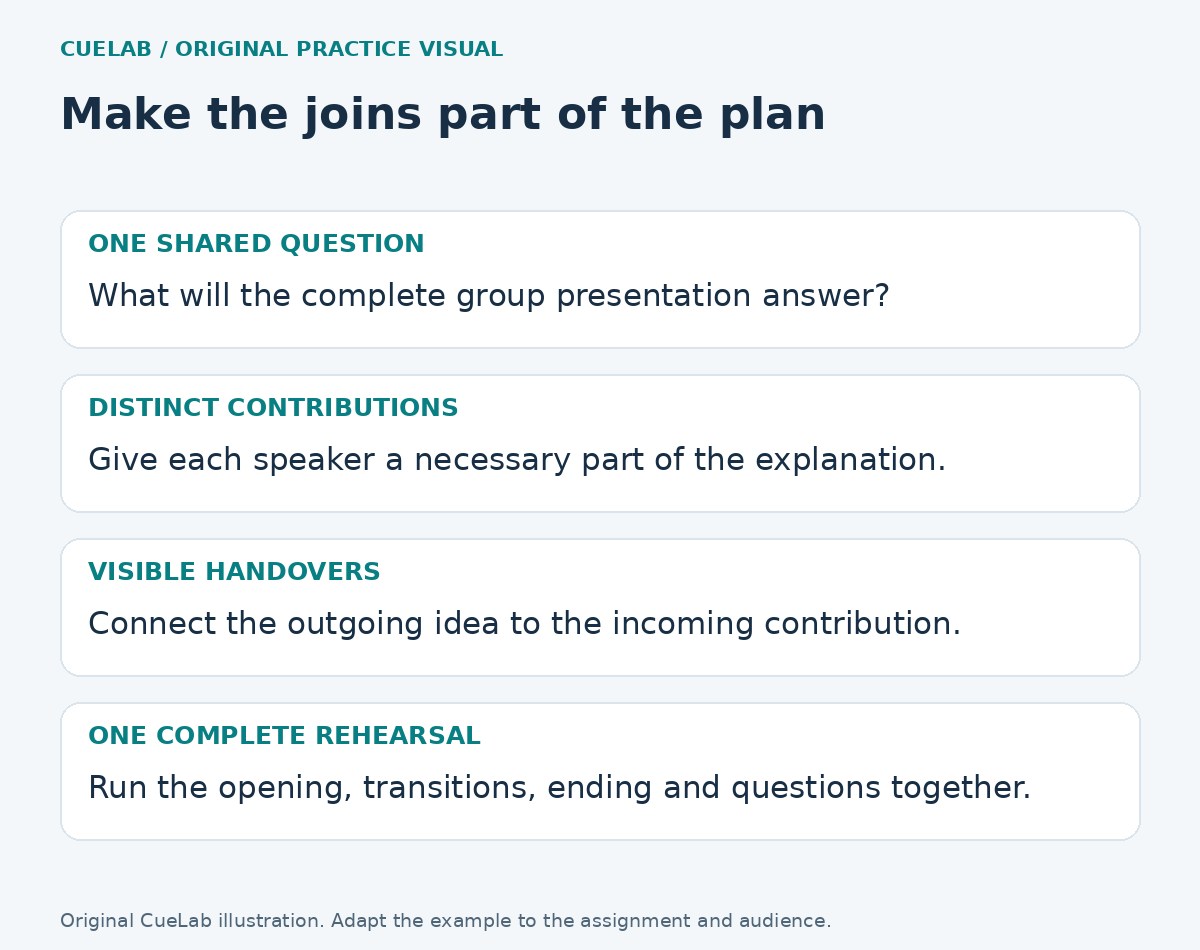
Assign responsibility for the joins
Each member needs a content contribution, but the group also needs someone to check sources, integrate the argument, keep the visual style readable, and organize rehearsal. These responsibilities can be shared or rotated. A person labelled “timekeeper” still needs a substantive speaking role when the assessment requires everyone to speak.
Record a concrete output and a review point for each task. “Prepare the evidence comparing access to the two venues, then have another member check the source” is easier to act on than “do the research.” Leave enough time for the group to remove overlap and repair gaps before the final rehearsal.
Write handovers that connect ideas
“Now Alex will speak” identifies the next person but leaves the audience to infer why the subject is changing. A more useful handover might say, “We have compared travel access; Alex will now show how the room layout affects the same event requirements.” It names the next person while preserving the shared question.
Practise both sides of each handover. The incoming speaker should be ready to begin at the point the outgoing speaker created, including control of the slides or shared materials. When the connection sounds awkward, inspect the order of the ideas before adding more linking phrases.
Rehearse one complete presentation
Run the whole talk with everyone present, including the opening, transitions, media, and ending. Record where time expands and where a listener might need context nobody has supplied. Individually polished sections can still create a confusing group presentation when they repeat definitions or make inconsistent claims.
Agree who will route questions and how another member can add a relevant point without talking over the first answer. Choose a fallback for an absent member or a failed visual, consistent with the assignment’s rules. The group should understand the complete argument even when each person has deeper responsibility for one section.
Choose the idea you can execute clearly
Pick a format that helps the audience perform the task the assignment sets, then scale it to the people and time available. A modest comparison with well-checked evidence is often more useful than a complicated simulation the group cannot rehearse. Use a complete practice run to decide what to simplify.
The presentation time planner can support your run sheet, and the transition guide helps diagnose weak connections. For the final question period, see how to handle questions you cannot answer.
Reference: University of Wollongong: Oral Presentations. The twelve scenarios and eight-minute run sheet are original CueLab practice material.