24 Presentation Topics for College Students, with a 5-Minute Outline
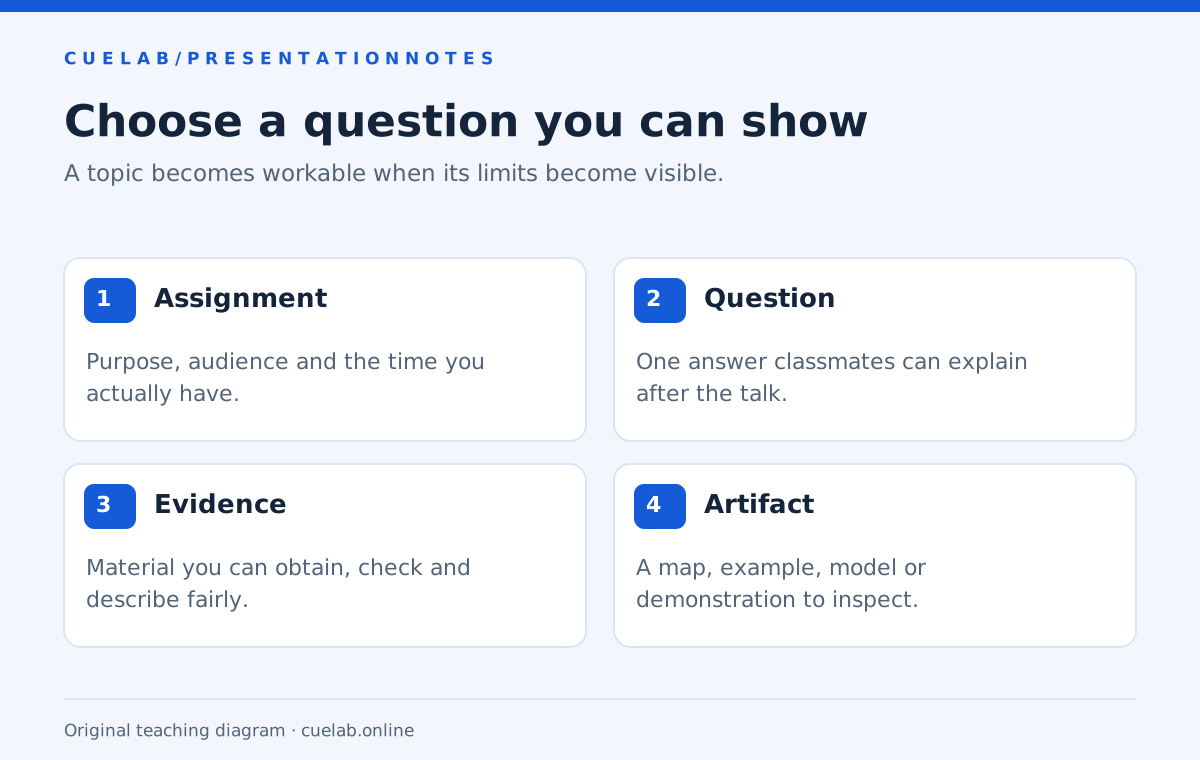
Good presentation topics for college students give a class something specific to understand, compare or try. A title such as “Technology” gives you a subject area, but “What changes when two apps ask for the same phone permission?” gives you a question, a demonstration and a manageable boundary. That difference matters when you have five minutes and classmates who do not share your background knowledge.
The 24 ideas below are starting points for informative presentations. Each comes with a way to show the idea and a sensible place to begin gathering evidence. They are not claims that the suggested result is already true. Choose one, check what the evidence actually supports, and adjust the title before making your slides.
Choose for the assignment before choosing for the audience
Read the brief for the required purpose, duration, sources and visual format. An informative presentation explains something; a persuasive assignment asks listeners to accept a claim or take an action. “How our library reservation system works” and “Our library should change its reservation rules” may use some of the same material, but they are different assignments. Keep your title and closing aligned with the one you have been given.
Next, write down what classmates already know. A mixed class may need a short explanation of a technical term that would be unnecessary in a specialist seminar. If that explanation would consume most of your time, choose a narrower question. You can give a clear, useful talk about one part of a large issue without pretending to cover the whole issue.
24 presentation topics with something concrete to show
Use the evidence column as a research route, not as a substitute for research. A local observation can illustrate a process, but a small convenience sample cannot establish what all students do. Where an idea involves institutional rules, check the actual rule for your college and the date on the document.
Campus life and everyday decisions
| Presentation question | What to show | Where to start |
|---|---|---|
| 1. What can you learn from comparing two routes to the same campus building? | A map with distance, crossings and access points. | Walk the routes safely; separate measured journey times from assumptions about accessibility. |
| 2. How does a library book move from return desk to shelf? | A simple sequence diagram with the points a reader can see. | Library guidance and a staff explanation, with permission where needed. |
| 3. Why can two student budgets with the same total feel different? | Two clearly fictional budgets separating fixed, flexible and irregular costs. | A transparent calculation; explain the assumptions rather than giving personal financial advice. |
| 4. What does a course syllabus tell you about how to plan a semester? | A calendar translating deadlines into preparation stages. | Your course brief; use a redacted or invented example to protect personal information. |
Digital tools you can demonstrate
| Presentation question | What to show | Where to start |
|---|---|---|
| 5. What happens when an app asks for location permission? | Permission screens and the difference between the available choices. | Current official documentation for one operating system; do not generalize across every phone. |
| 6. How can a spreadsheet change its answer when a reference moves? | The same small formula copied using relative and absolute references. | An original spreadsheet with visible formulas and checked arithmetic. |
| 7. What makes two search results useful for different questions? | A side-by-side comparison of author, date, evidence and purpose. | The original pages and your library’s source-evaluation guidance. |
| 8. How does a document change when headings are used properly? | A document outline, navigation view and exported file. | The editor’s official accessibility guidance; avoid claiming a full accessibility audit. |
Communication and media
| Presentation question | What to show | Where to start |
|---|---|---|
| 9. How does an instruction change when its order changes? | Two original versions of a short assembly or submission instruction. | A task walkthrough; describe it as an illustration rather than a controlled study. |
| 10. What information disappears when a news story becomes a headline? | One headline beside the corresponding paragraph and original source. | The full report; distinguish an omission from an error. |
| 11. How does a chart’s scale affect the comparison you notice? | The same fictional data on two clearly labelled axes. | Your own chart file with identical values in both versions. |
| 12. What makes a caption useful when someone cannot hear the audio? | A short original clip with two caption versions. | Current captioning guidance; include meaningful sounds as well as speech. |
Science through a small model
| Presentation question | What to show | Where to start |
|---|---|---|
| 13. Why does a paper bridge change when its shape changes? | Two paper structures built with the same material. | A safe tabletop demonstration; record dimensions and loading method. |
| 14. What is the difference between a measurement and an estimate? | A measured object beside several estimates and the measurement method. | A small class activity, with uncertainty and units made visible. |
| 15. How does insulation change a simple cooling experiment? | A labelled setup and a temperature-over-time chart. | Course-approved methods; use safe temperatures and report the actual conditions. |
| 16. What can a scale model explain, and what does it leave out? | A model with a matching list of represented and omitted features. | One course concept, such as a watershed or transport network. |
Business and work processes
| Presentation question | What to show | Where to start |
|---|---|---|
| 17. How can a queue look short while the wait remains long? | A fictional service sequence with different task durations. | A transparent model; do not label its output as a real business result. |
| 18. What is the difference between revenue, gross profit and cash received? | One fictional sale followed through a dated ledger. | Introductory accounting material and checked calculations. |
| 19. How does a handover fail when the next owner is unclear? | A two-team process map with missing and explicit ownership. | An invented case or a properly anonymized process you may discuss. |
| 20. What makes a customer survey question difficult to answer? | Three original questions revised to ask one thing at a time. | Your methods course material; explain the limits of a small sample. |
Culture, design and local history
| Presentation question | What to show | Where to start |
|---|---|---|
| 21. What can one old photograph tell us about a familiar street? | A rights-cleared photograph, a current view and a map. | An archive record; separate visible details from historical interpretation. |
| 22. How does packaging change the information a buyer sees first? | Two packages with the visible information grouped by purpose. | The actual labels; distinguish your observation from a claim about buyer behavior. |
| 23. What does a place name reveal about a local area’s history? | A timeline with the documented changes in spelling or use. | Municipal records or a reputable local archive. |
| 24. How does a poster guide the order in which we read it? | Two original poster layouts with the same words. | A visual walkthrough; explain your design choices without inventing audience-test results. |
Narrow a broad subject into one answerable question
Take “social media,” a subject that could absorb an entire course. “Social media and students” is still broad because it does not tell the listener which activity, outcome or situation you will explain. “What changes when a class group chat uses one pinned instruction instead of several scattered messages?” gives you a boundary and an artifact you can make yourself. It also lets you explain what you did not investigate, such as long-term academic outcomes.
Try this sentence: “By the end, my classmates should be able to explain how ___ works in ___.” Fill both gaps with concrete terms. If you need several sentences to describe the outcome, remove one part. For a persuasive assignment, use an explicit proposed action instead and consult the college persuasive speech topics guide.
A quick way to compare your three best ideas
Give each candidate one point for each of five practical checks: it fits the assignment, matters to this audience, has evidence you can obtain, has something clear to show, and fits the speaking time. This is a CueLab planning exercise, not a validated assessment. A topic that fails the assignment or evidence check needs revision even if its total looks good.
For example, “the future of transport” may be interesting but difficult to substantiate in a short classroom talk. “How two routes connect the bus stop to our library” gives you a map, observable details and a defined audience. The second idea does not become better simply because it is local; it becomes workable because you can investigate it and make the limits visible.
A worked five-minute presentation plan
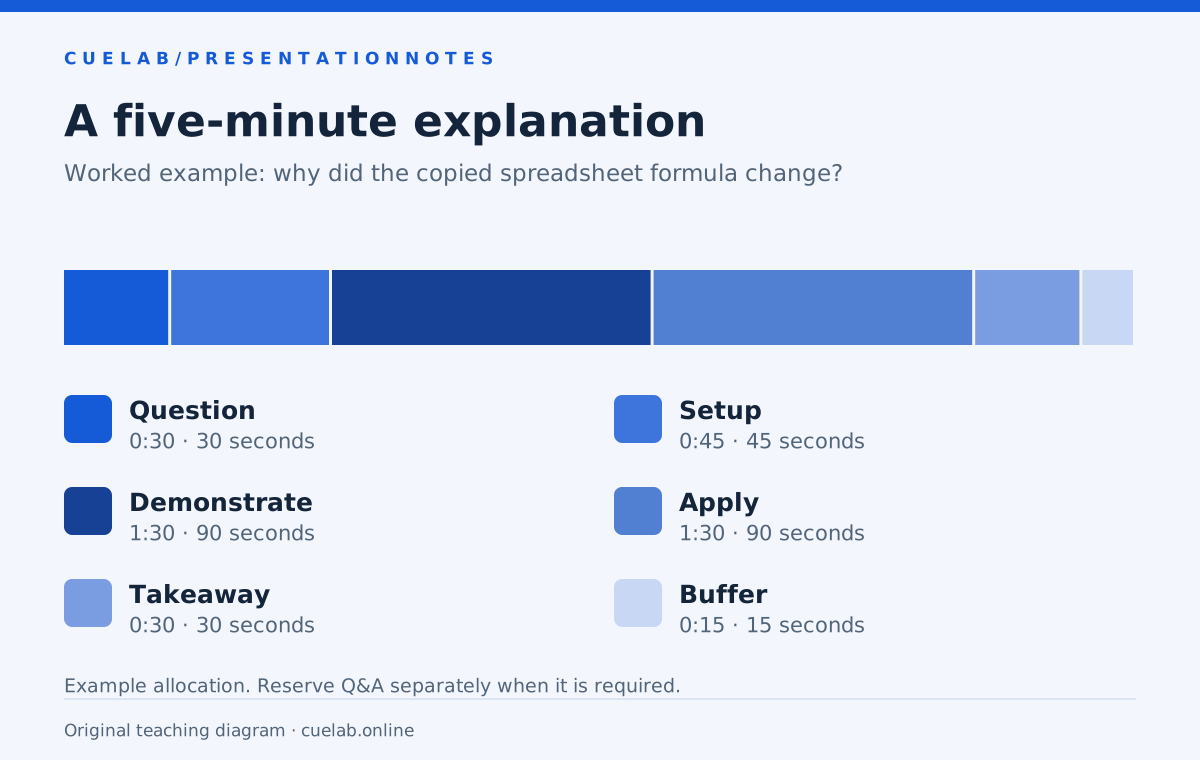
Suppose you choose topic 6, spreadsheet references. Your question is: “Why did the total change when I copied this formula?” Prepare a small sheet with three prices and one tax-rate cell. Check the arithmetic beforehand and use fictional amounts so classmates can inspect the process without worrying about anyone’s finances.
| Time | What the audience sees | What you explain |
|---|---|---|
| 0:00–0:30 | The copied formula giving an unexpected result. | The question you will answer. |
| 0:30–1:15 | The original formula and its cell references. | Which references can move. |
| 1:15–2:45 | A copy using relative references, then a corrected version. | What changes and why the fixed reference matters. |
| 2:45–4:15 | A new row for classmates to predict. | Apply the rule and check the prediction. |
| 4:15–4:45 | The correct result and a short rule. | The one idea to remember. |
| 4:45–5:00 | No new material. | Leave room for a slower demonstration or transition. |
This plan is an example rather than a required formula. If your five minutes must include questions, reserve that time before allocating the explanation. Put the sections into the Presentation Time Planner, then check a spoken rehearsal with the rehearsal timer. A calculation from the script alone will not include the time it takes to point, click or let someone answer.
Research enough to explain the limits
For every important factual statement, keep the source, date and relevant page or passage in your notes. Go to the original guidance when you describe a software feature or a college policy. If two sources disagree, find out whether they cover different dates, populations or definitions before deciding one is wrong. A presentation can acknowledge that a question remains unresolved.
Label invented numbers as examples on the slide itself. If you run a small demonstration, explain its conditions instead of introducing it with “research proves.” A paper bridge that held more weight on your desk establishes what happened in that setup; it does not establish a universal result for every bridge material and shape. That qualification makes your explanation more precise without making it less interesting.
Build visuals around the explanation
Use a visual when it gives listeners something they need to inspect: a route, a formula, a sequence, a label or a comparison. Avoid adding a decorative picture to every slide simply to fill space. When a chart is central, make the units and comparison clear enough to explain aloud. CueLab’s guide to describing a chart without reading every number can help you decide what to say about it.
Have a backup for anything that depends on live software. A screenshot of the before-and-after formulas can preserve the lesson if the spreadsheet does not open. Check permission before displaying classmates’ work, screenshots of private chats or identifiable survey responses. An original fictional example is often easier to explain and safer to share.
Turn the chosen topic into a rehearsal task
Before polishing the slides, explain your question and answer aloud in about a minute. If the explanation keeps branching into new subjects, narrow it again. Then rehearse the full version with the actual demonstrations, noting the section that runs long rather than speeding up the entire talk. Your final title should describe the question the audience will hear you answer.
A useful next step is to write three lines: the question, the artifact you will show, and the evidence you still need. When those lines fit together, you have more than an interesting topic; you have the beginning of a presentation you can deliver.
Further reading: Choosing a Topic, Communication in Practice — University of Minnesota Libraries. The topic ideas, comparison exercise and worked timing plan on this page are original CueLab teaching examples.