Pecha Kucha 20×20: A Complete 20-Slide Storyboard

A Pecha Kucha 20×20 presentation uses 20 images that advance automatically after 20 seconds each. The full sequence lasts 400 seconds, or 6 minutes and 40 seconds. That fixed rhythm changes how you plan: each slide needs a clear purpose, and the spoken explanation must be able to move on when the image changes.
The official PechaKucha description establishes that format. The storyboard and rehearsal methods below are original practice material for building a talk within it. If a teacher or event organizer gives you a modified version, follow their instructions and label it accurately rather than assuming every short, image-led presentation uses the same timing.
Choose a story that can move in twenty steps
A topic is not yet a route through twenty images. “My study space” could become a collection of unrelated photographs, while “How I changed a crowded desk to support one study task” suggests a progression from a problem to a response and a check. The second version gives you something to leave out as well as something to show.
You do not need a dramatic transformation or a claim that your method works for everyone. A small process, an observation, a design decision, or a personal interest can provide enough material when its development is visible. Choose a subject you can explain accurately and for which you can obtain appropriate images.
Plan the talk before collecting twenty pictures
Write the audience’s starting question and the idea you want them to leave with. Then identify the major turns in the explanation: what needs context, what changes, what the change reveals, and where the story ends. This keeps attractive but irrelevant pictures from deciding the structure for you.
For the illustrative desk example, four planning stages can hold the twenty slides: establish the task, notice the obstacles, make deliberate changes, and check what remains difficult. These stages are an editorial planning aid, not an official PechaKucha requirement. Another subject may need a chronological story or a sequence of comparisons instead.
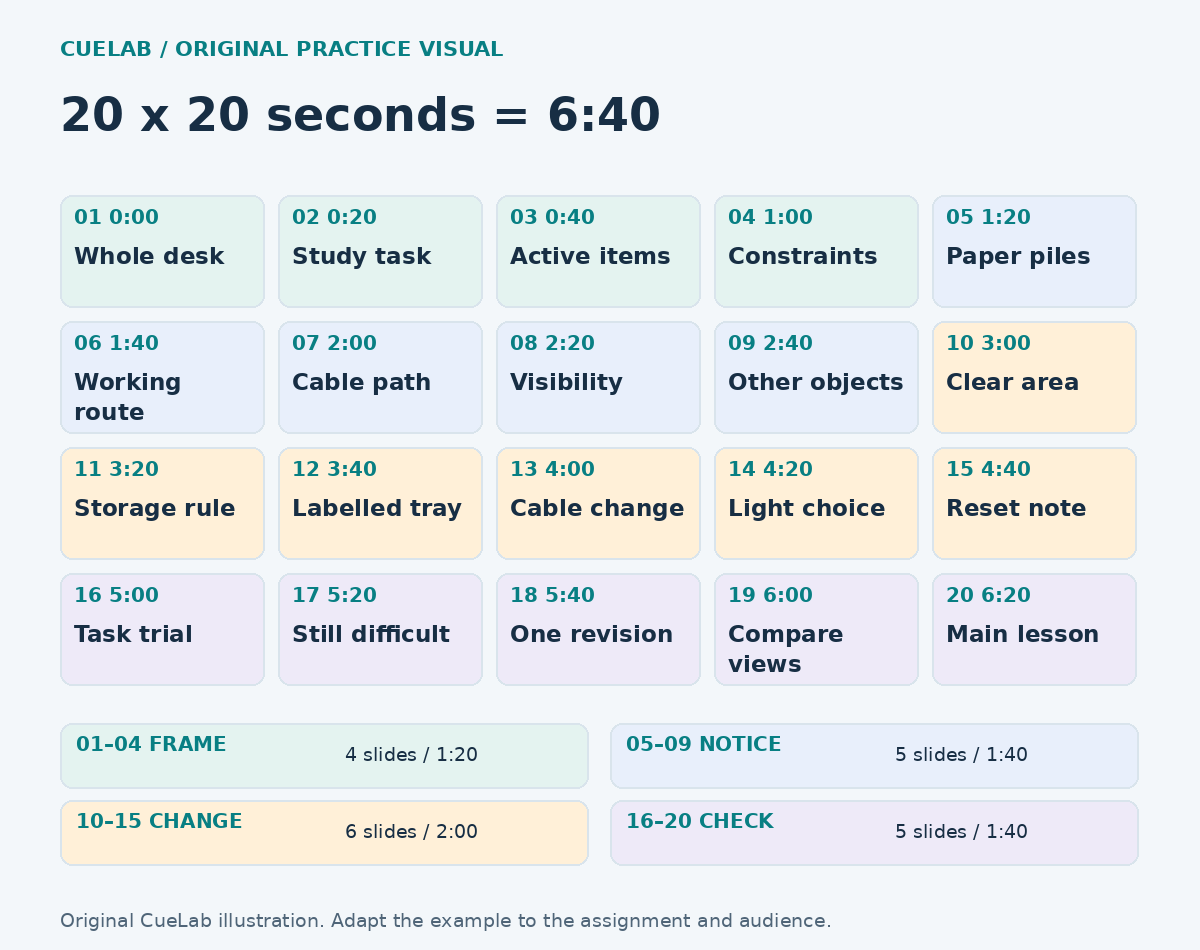
A complete 20-slide Pecha Kucha storyboard
The following storyboard is hypothetical. It demonstrates how a small subject can develop across the full format; it does not claim that CueLab tested a real desk or measured a student’s concentration. If you use the idea, document your own space and describe only the changes and observations you actually make.
| Slide and start | Image to prepare | Job of the spoken explanation |
|---|---|---|
| 1 · 0:00 | The whole desk before any changes. | Introduce the question: can this space support one defined study task? |
| 2 · 0:20 | The materials needed for that task. | Explain what the task actually involves rather than judging the desk by appearance. |
| 3 · 0:40 | Only the items that must remain close. | Distinguish active materials from things stored nearby for other reasons. |
| 4 · 1:00 | A simple sketch of the available space. | State the real constraints, such as shared use or limited storage. |
| 5 · 1:20 | The different paper piles. | Show why the next document can be hard to identify. |
| 6 · 1:40 | The route between the book and the writing area. | Notice which objects interrupt the intended working sequence. |
| 7 · 2:00 | A visible cable path. | Explain a practical obstruction without making electrical or safety claims you cannot assess. |
| 8 · 2:20 | The view under the available light. | Describe what is easy or difficult to see in this particular setup. |
| 9 · 2:40 | Objects unrelated to the current task. | Separate an observed interruption from a guess about everyone’s attention. |
| 10 · 3:00 | A cleared area for the active task. | Introduce the first change and explain why that area was chosen. |
| 11 · 3:20 | A boundary between active work and stored materials. | Explain the rule for what stays on the desk. |
| 12 · 3:40 | A clearly labelled tray or folder. | Show how the next piece of paper can be located. |
| 13 · 4:00 | The revised cable route. | Describe the change you actually made and any remaining constraint. |
| 14 · 4:20 | The adjusted position of a light or document. | Explain the local visibility choice without claiming a universal setup. |
| 15 · 4:40 | A short reset note beside the storage area. | Describe the routine intended to keep the arrangement usable. |
| 16 · 5:00 | The desk during the chosen task. | Return to the original purpose and show how you checked the arrangement. |
| 17 · 5:20 | One remaining difficulty. | Keep the account honest by identifying something the changes did not resolve. |
| 18 · 5:40 | One small revision. | Explain what the remaining difficulty suggested changing next. |
| 19 · 6:00 | A matched before-and-after view. | Compare the same task and viewpoint; avoid treating a tidier image as proof of better learning. |
| 20 · 6:20 | A simple final image tied to the task. | End with the central lesson: judge a workspace by the work it needs to support. |
The final slide begins at 6:20 and completes its twenty seconds at 6:40. The times in the table are slide start times, not extra time allowances. If you include an opening title or closing credit slide in a twenty-slide assignment, it occupies one of those twenty slots unless the organizer explicitly tells you otherwise.
Give each slide one speaking job
Write a sentence beside each proposed image explaining what changes in the audience’s understanding while it is on screen. Slide 5 in the example establishes a problem with identifying papers; slide 12 introduces a possible response. If both slides merely say “organization matters,” they are not yet doing enough distinct work.
A speaking job can include a short example or contrast, but it should be small enough to complete comfortably. You might explain why a particular shelf belongs in the story, or what one visible detail reveals. A slide that requires several definitions and a long qualification probably needs a different visual or a simpler point.
Write the words against the actual timing
Draft enough wording to develop the idea, then speak it with the automatic sequence running. Do not assume that a fixed number of words fits every twenty-second segment: unfamiliar names, visual explanation, emphasis, and your natural pace all change what you can say comfortably. The test is a timed delivery in which the image and the spoken idea remain connected.
For slide 12, a possible practice line is: “This tray holds the papers needed for the task I chose. The label is specific enough that I can tell what belongs here, and everything else needs another home. The change is small, but the rule is now visible.” These are illustrative words, not an audio-verified twenty-second script; trim or revise after speaking them yourself.
Leave somewhere to go if you finish early
Finishing a slide’s thought before the image changes does not automatically mean you need more content. A brief pause can let the audience look at the detail you just explained. If a section consistently ends much too early, check whether its speaking job is underdeveloped or whether two weak slides should be replaced with more useful material.
Avoid improvising a second story simply to fill the remaining seconds. That can leave you halfway through an unnecessary detail when the next image arrives. Practise a clean final phrase for each segment and allow the picture to carry part of the explanation.
Decide what happens at the changeover
The transition between slides should advance the thought, not repeatedly announce “next slide.” A problem image can end by naming the question the following image answers. For example, “The papers are all visible, but the next task isn’t” gives a labelled-tray image a reason to appear.
Occasionally a sentence may continue across a slide change, but plan that connection deliberately and test it. If every point depends on starting and ending at an exact syllable, the talk becomes fragile. A route with clear conceptual boundaries gives you more room to recover from a small hesitation.
Prepare a recovery line for a missed beat
If an image advances before you finish, prioritize the main connection and rejoin the current slide. In the desk story, “The main issue was finding the next document; this is the change I tried” can bridge from a crowded-paper image to the response. The aim is to restore the audience’s route rather than explain every sentence you omitted.
Practise this once by intentionally skipping a secondary detail. You are not training yourself to rush through the rest of the talk; you are learning which idea must survive if a segment slips. If you repeatedly need a recovery line at the same slide, reduce the material there before the actual presentation.
Make the visual sequence readable and honest
Use images you created or have permission to use, and record credits as the assignment or event requires. Crop and label only to make the relevant detail easier to see, while preserving context needed for an honest comparison. A before-and-after pair should not rely on a different viewpoint or concealed objects to exaggerate what changed.
Test the visuals at the size and distance listeners will experience. Tiny labels, busy collages, and long paragraphs compete with the short spoken segment. If a diagram is essential, simplify it to the relationship being explained and make necessary text readable; the format does not make inaccessible visuals acceptable.
Rehearse the automatic sequence as a whole
Configure the presentation file to advance each of its twenty slides after twenty seconds, following the instructions for your presentation software. Then test the saved file on the actual device or a comparable setup. Confirm whether the event expects a live deck, a video, or another submission format, and check that transitions, media, and the final slide behave as intended.
Run the complete sequence without stopping after mistakes, then mark the places where content and images separated. Fix those sections and repeat the full run after the changes. Rehearsing isolated segments is helpful, but it does not reveal whether an awkward transition creates problems several slides later.
Use a slide audit after the first complete run
Make a short record with four columns: slide number, intended speaking job, what actually happened, and the next change. “Slide 7 felt rushed” is a useful observation, but “The cable explanation introduced three new terms before the image changed” points more clearly to a repair. Keep the review focused on the relationship between the picture and the explanation.
If a single image needs more than twenty seconds of explanation, split the idea into distinct stages and decide which other material should leave the sequence. Simply showing the same crowded picture twice may preserve the same problem for longer. A first image might establish the whole arrangement, while a later detail view explains the part listeners now have enough context to inspect.
Ask a practice listener to identify the main idea and one point where the image changed before they understood its purpose. Their answer does not prove that the presentation will work for every audience, but it can reveal a missing connection you already know too well to notice. Revise that specific place, then check the new version within the automatic sequence.
Keep the final review modest enough to act on. Three precise changes, followed by another full run, provide a clearer preparation task than a page of general comments about confidence. Record unresolved problems honestly so you can simplify the talk or ask the organizer about a necessary adjustment.
Take the storyboard into your own subject
Keep the twenty speaking jobs and replace the desk story with a subject you know. A hobby, a small design project, a local observation, or a process you can document may all work when the sequence has a clear destination. If the idea needs extensive background or a dense table of qualifications, narrow it before forcing it into the format.
CueLab’s presentation image guide can help you choose visuals that support the explanation. The presentation time planner is useful for checking the broader structure, while the presentation backup plan helps you prepare for equipment problems.
Reference: PechaKucha: About the 20×20 presentation format. The desk storyboard, stage allocation, and practice wording are original CueLab illustrations.