How to Cut a 20-Minute Presentation Down to 10 Minutes Without Losing the Point

A meeting has fallen behind, and your twenty-minute presentation now has ten minutes. Deleting every second slide seems fair until you notice that the remaining slides no longer explain one another. Speaking twice as fast preserves the script but leaves the audience with half the opportunity to understand it.
To shorten a presentation, reduce the job it needs to do. Keep the decision, the evidence that makes that decision reasonable, and the conditions that could change it. Then rebuild the route between those pieces. This guide uses a fictional project proposal to show how to turn a twenty-minute talk into a ten-minute version, including a timing plan and an emergency cut you can make during delivery.
Find out what “ten minutes” actually includes
Before editing, ask whether the new slot includes introductions, a demonstration, questions, or the handover to the next speaker. A ten-minute speaking allowance and a ten-minute agenda item are different assignments. If discussion is included, a seven-minute explanation may be more useful than nine minutes and fifty seconds of uninterrupted delivery.
Also check whether the audience has changed. A short briefing for the manager who commissioned the project can assume knowledge that a short briefing for a new committee cannot. Cut familiar background only when it is actually familiar to the people in front of you. Otherwise, you save time in the script and spend it answering basic questions later.
Write the practical constraint at the top of your notes: “Ten minutes total; two reserved for questions; audience has read the summary.” This becomes an editing rule. Without it, every cut is an argument about whether a piece of information is interesting, and nearly everything you researched will pass that test.
Replace the topic with one audience outcome
“An update on customer support” is a topic. “Approve a two-week trial of a new triage process” is an outcome. A topic can expand almost indefinitely, while an outcome tells you what listeners must understand before the session ends.
Complete this sentence: “After this presentation, the audience should be able to ______.” Use a concrete verb such as decide, compare, diagnose, perform, or explain. If the sentence contains three unrelated verbs, your short version probably needs a narrower assignment.
For the fictional proposal in this guide, the outcome is: “Decide whether to approve a two-week support-triage pilot with existing staff.” The audience needs to understand the current delay, why the proposed change might help, what the pilot requires, and how success or failure will be judged. They do not need a complete history of the support department.
If the basic argument is still unclear, use CueLab’s guide to structuring a presentation from opening to closing before trying to compress it. Editing works better when you know which argument you are preserving.
Sort material into keep, compress, move, and remove
Work at the level of ideas before counting slides. One slide might contain a crucial explanation that needs two minutes; four simple slides might support a single example in the same time. Slide count is an unreliable substitute for a timed run.
Give each section one of four jobs. Keep material that changes the audience’s decision. Compress material that is necessary but currently takes a long route. Move useful reference detail into a clearly labeled appendix or follow-up document. Remove material that repeats a point without adding evidence or understanding.
| Material in the original talk | Editing choice | Reason |
|---|---|---|
| Three-year department history | Compress to one sentence | Only the current constraint affects the pilot. |
| One representative delayed ticket | Keep | It explains the handoff problem. |
| Four similar delayed-ticket examples | Remove three | They repeat the same mechanism. |
| Detailed staffing spreadsheet | Move to appendix | Available for scrutiny without reading every row aloud. |
| Risk that urgent cases wait longer | Keep | It could change the decision. |
| Specific approval request | Keep | It tells the audience what happens next. |
The most dangerous cuts often look small: a denominator, an exception, a definition, or the sentence explaining why two results are comparable. These are not decorative details. If removing a sentence makes a claim broader than the evidence supports, restore it and cut something else.
A worked twenty-to-ten-minute redesign
Imagine the original talk spends three minutes on background, four on diagnosing the problem, four comparing three solutions, four describing the preferred pilot, three discussing risks, and two asking for approval. That structure fits twenty minutes, but it cannot survive a simple fifty-percent trim in every section.
The shorter version can start with the recommendation, show the one handoff that creates avoidable delay, explain why the pilot addresses it, and state the decision boundary. A small amount of context remains, but the full comparison of every option moves into the supporting material.
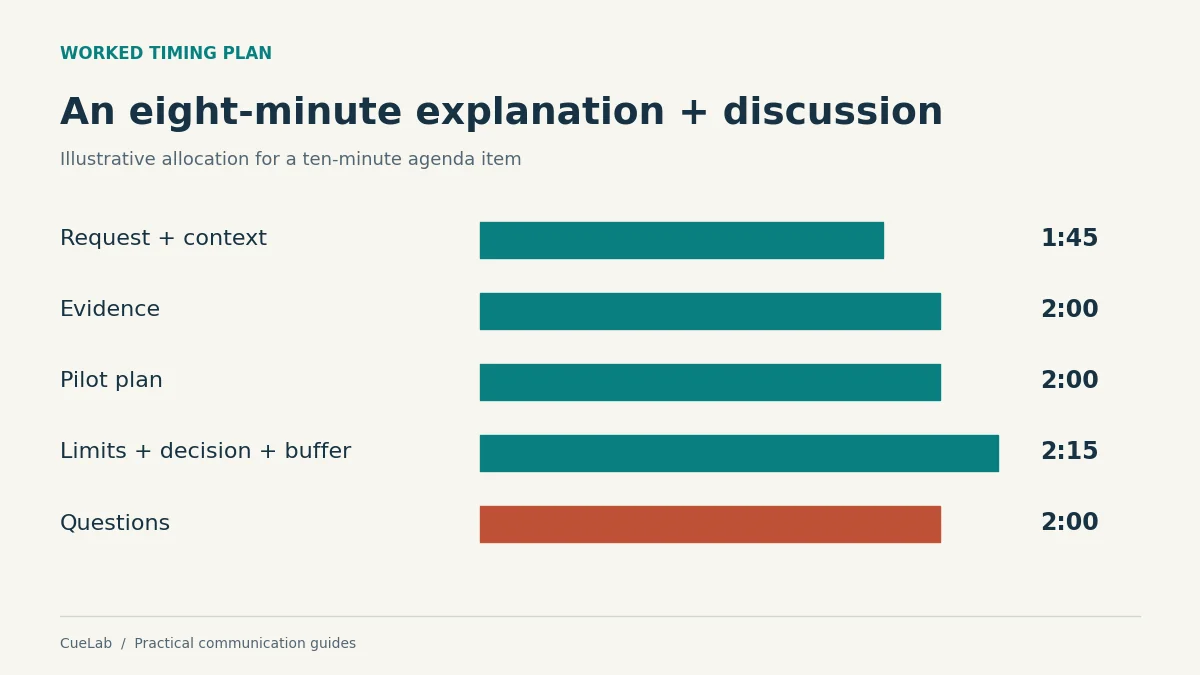
| Elapsed time | What the audience receives |
|---|---|
| 0:00–0:45 | The pilot recommendation and the decision required. |
| 0:45–1:45 | The current support process and its relevant constraint. |
| 1:45–3:45 | One worked ticket example and the evidence behind the diagnosis. |
| 3:45–5:45 | What changes during the pilot and who does the work. |
| 5:45–6:45 | The main risk, safeguard, and unresolved uncertainty. |
| 6:45–7:30 | Success criteria, owner, and approval request. |
| 7:30–8:00 | Transition allowance and brief clarification. |
| 8:00–10:00 | Questions and decision discussion. |
Notice what gets protected: the explanation of the problem and the explanation of the proposed change. If these become vague, the audience is being asked to approve a label rather than a plan. Notice also what becomes shorter: historical context and repeated comparisons, because they do less work for this particular decision.
Shorten the route to an example, not its useful detail
A good example often saves explanation time. “Tickets move between teams” is brief but abstract. “A billing question waits in the general queue, reaches an agent who cannot approve a refund, then starts another wait in billing” gives the audience a process they can examine.
The example does not need a fictional customer’s biography, five timestamps, or a dramatic opening. It does need the starting condition, the step that causes trouble, and the consequence. Remove the scene-setting around those elements before removing the example itself.
Likewise, retain the evidence boundary. If your conclusion comes from a small pilot, say so. If the figures cover only weekday tickets, keep that restriction. A compact presentation can be selective about scope without becoming selective about inconvenient facts.
This distinction matters especially when presenting a complex topic. Simplification should reduce the number of things listeners must track, while leaving the relationship between the remaining things intact.
Rewrite transitions after removing sections
After a major cut, sentences such as “As the previous three examples showed” may no longer make sense. A chart may refer to an option that the audience never saw. The argument can feel broken even when every remaining slide is individually clear.
Read only the slide titles and the first spoken sentence for each slide. They should form a coherent route through the decision. If the route jumps from a problem to a solution without a reason connecting them, you have removed a bridge.
For the support example, the bridge might be: “Because the second wait begins when a ticket changes teams, we propose identifying billing tickets before they enter the general queue.” That sentence earns its place by connecting diagnosis to action. It is more useful than announcing, “Now let’s move on to the next section.”
Claim-based headings can help you find missing links. CueLab’s guide to writing slide titles that make a claim explains how a title can reveal the role of a slide in the argument.
Build an appendix that you can actually use
Moving material to an appendix is useful only if you can retrieve it quickly and explain why it is there. Give backup slides descriptive titles such as “Staffing assumptions for the two-week pilot” or “Why we rejected automatic routing at this stage.” A pile of discarded slides is harder to search under pressure.
Keep the main conclusion honest without the appendix. A listener who never opens the extra material should still hear the main limitation and understand the approval request. Supporting calculations can move; a warning that reverses the apparent result should remain in the talk.
When a question needs detail, acknowledge its connection to the decision, open the relevant backup slide, answer, and return to the decision slide. If you cannot support the answer, say what you need to check. Our guide to handling questions you cannot answer provides a practical response structure.
Rehearse the edited version as a new talk
Silent reading does not reveal the time needed to explain a chart, move a cursor, wait for a demonstration, or let a difficult point settle. Rehearse aloud using the actual slides and transitions. Toastmasters’ preparation guidance recommends repeated practice with a timer; for this task, the useful measurement is the full delivery, including actions and pauses.
Record elapsed time at three checkpoints: the end of context, the end of the main evidence, and the beginning of the decision request. This shows where the overrun begins. Knowing only the final duration tells you that something is wrong without telling you which section is responsible.
If the talk runs eleven minutes, do not distribute a one-minute cut across every sentence. Find the section with the least decision value. Remove a repeated argument, replace a narrated list with a concise comparison, or narrow the outcome again. Preserve normal speech and the time listeners need to inspect evidence.
Ask a rehearsal listener two questions: “What am I asking you to decide?” and “What would make you hesitate?” If they remember the recommendation but cannot identify its main condition, the short version may sound more certain than you intended.
Prepare a safe cut for an interruption
Even a well-timed talk can lose a minute to a late start or an important question. Choose one optional passage in advance and write the exact transition that skips it. This prevents rushed decisions about what to delete while you are speaking.
In the support proposal, a secondary comparison might be optional. The transition could be: “The alternatives are documented in the appendix; the decision today concerns whether this limited pilot is worth running.” You can then continue with safeguards and success criteria without pretending the comparison happened.
If the time limit becomes too short for the required decision, change the request openly. Ask for permission to circulate a written proposal or schedule the necessary discussion. A two-minute summary can introduce a consequential decision, but it should not disguise the absence of time to examine it.
Your final editing check
Before presenting, check that the shorter talk still answers five questions: What is the point? Why should this audience care? What supports it? What could change the conclusion? What happens next? Each answer should be easy to locate in your notes.
Then run the talk once more at an ordinary pace. Stop at the deadline even if unfinished and mark the material you reached. That is the version the audience can actually receive. Edit from that evidence, rather than from the hope that you will become faster on the day.
A successful ten-minute presentation leaves listeners with a usable decision and an accurate understanding of its limits. It can cover less ground than the original while doing its most important job more clearly.
Further reading
Toastmasters International: Preparing a Speech
The project, editing categories, and timing allocation above are original worked examples. They illustrate an editing method and are not findings from a controlled study.