Table or Chart? How to Choose the Right Format for a Presentation

You have six numbers to show in a presentation. A chart looks more visual, but the audience keeps asking for the exact figures. You replace it with a table, and now nobody notices the change that the figures were meant to explain. Both versions contain the same data; they ask the audience to do different work.
Choose a table when people need to look up, compare, or check precise values. Choose a chart when they need to see a pattern, ranking, distribution, or relationship. When the meeting requires both, separate the first impression from the detailed inspection instead of squeezing everything into one display. This guide develops that decision using an original example, then shows how to check the result before presenting it.
Finish the sentence “The audience needs to…”
Start with an action rather than a format. “The audience needs to confirm the June total” points toward a table or a clearly labeled number. “The audience needs to see whether requests are rising” points toward a chart. “The audience needs to choose between three suppliers” may call for a comparison table containing both numbers and words.
Be specific about the audience’s first task. A slide that supports a spoken recommendation has a different role from a spreadsheet someone will inspect later. The latter can hold more detail because its user controls the pace and can revisit a cell. During a talk, the presenter largely controls how long each display remains visible.
The UK Government Analysis Function makes a useful distinction in its guidance: demonstration tables support comparisons of values, while charts show patterns, trends, and relationships. Treat that as a starting point. Your final choice still depends on how much data there is and what the audience must do with it.
A decision guide for common presentation tasks
| Audience task | Start with | Check before using it |
|---|---|---|
| Find an exact amount, date, or rate | Small table or labeled value | Are units and period explicit? |
| See change across time | Line chart | Are time intervals and missing periods handled honestly? |
| Compare category sizes | Bar or dot chart | Does the ordering help the comparison? |
| Compare options with mixed attributes | Comparison table | Are the attributes genuinely comparable? |
| Inspect variation within a group | Distribution chart | Will the audience understand the display? |
| Check calculations or audit detail | Reference table outside the main talk | Can people access the underlying data? |
| Understand one decisive result | One labeled number with context | Would a chart add anything useful? |
This is not a rule that all numerical slides need a chart. A simple statement such as “The contract expires on 30 November” can be clearer as text. Likewise, a table is not automatically too dull for a presentation. A short, well-ordered table can answer a question with less effort than an elaborate visual.
Worked example: the same figures, two different questions
Consider a fictional support team with the following counts of new requests. The numbers are invented for this example and do not describe a real organization.
| Month | New requests |
|---|---|
| January | 120 |
| February | 125 |
| March | 118 |
| April | 160 |
| May | 165 |
| June | 162 |
If the question is “How many requests arrived in March?”, the table answers it directly: 118. A line chart without value labels would make the audience estimate the point’s position. If the question is “Did demand move to a higher level after March?”, a line chart makes the change easier to inspect across the whole period.
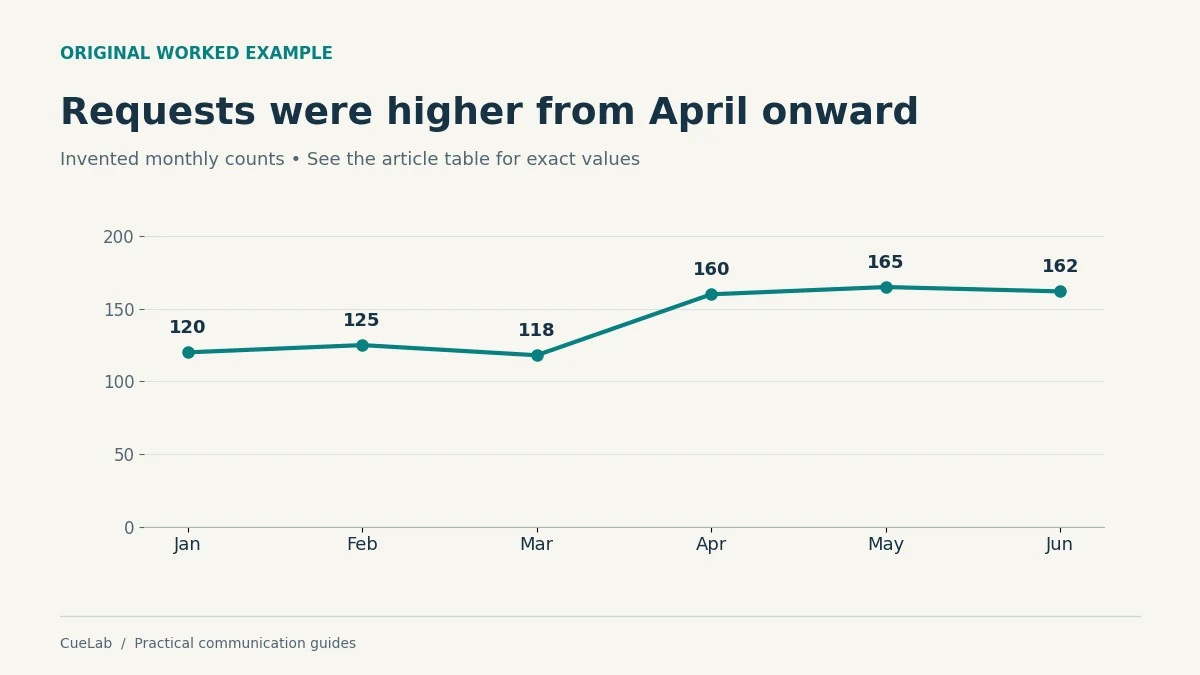
The display does not explain why the change happened. It might reflect demand, a reporting change, a new channel, or something else. A responsible title would be “Requests were higher from April onward.” “Our campaign caused a surge” requires evidence that this small series does not provide.
This is where the choice of display and the choice of claim meet. For a deeper look at that problem, read why a correct chart can still mislead an audience. Correct plotting does not make every interpretation justified.
When a table earns its place on a slide
A table is valuable when rows represent meaningful options and the audience must compare several attributes. Suppose a team is choosing a meeting venue. Capacity, accessibility arrangements, travel time, and available dates cannot all be represented honestly by the lengths of bars on one scale.
A compact table can keep those differences visible. Put the decision-relevant attributes first, use consistent wording, and explain any missing information. “Not confirmed” is a different state from “not available”; a blank cell can conceal that distinction.
Avoid turning qualitative judgments into numbers solely to make a chart possible. Giving each venue an unexplained score out of ten creates an appearance of measurement without showing how the score was produced. If a scoring model is useful, disclose the criteria, weights, and uncertainty before asking the audience to trust the total.
For a numerical table, keep precision consistent within a column and make the units obvious. Align figures so people can compare their place values. Use restrained emphasis to identify the row under discussion, rather than coloring every cell as if it were equally important.
When the table is asking for too much reading
A spreadsheet screenshot may contain everything the team knows and still be a poor presentation slide. Small text, many columns, and unexplained abbreviations make the audience reconstruct the analysis while you talk over it.
Ask which comparison must happen during this particular moment. If only two columns support the point, present those two and make the full table available separately. If the audience needs different parts of the table at different moments, split the explanation into stages while keeping the labels and units consistent.
Do not hide a comparison that could reverse your conclusion. Reducing the display is legitimate when the scope is clear; removing inconvenient rows without explanation is a different action. Say which rows are included and why, particularly when you are presenting a subset of a larger dataset.
The practical problem resembles overloaded bullet-point slides: listeners are asked to read, select, and interpret too much while also following the speaker. Changing bullets into cells does not remove that workload.
When a chart makes the task easier
A chart is useful when position, length, or shape can carry a comparison more directly than a series of separate numbers. A sorted bar chart can show a ranking. A line can show the path through time. A distribution display can reveal that the same average conceals very different experiences.
Choose the relationship first and the visual form second. For the request-count example, a line follows the ordered months. A pie chart would answer a different question about each month’s share of a six-month total, which is not the question the meeting is discussing.
Keep the display interpretable without a long decoding lesson. If a specialized chart is necessary, explain how to read it before asking the audience to interpret the result. A technically sophisticated graphic that consumes the entire slot in orientation may be unsuitable for the immediate task.
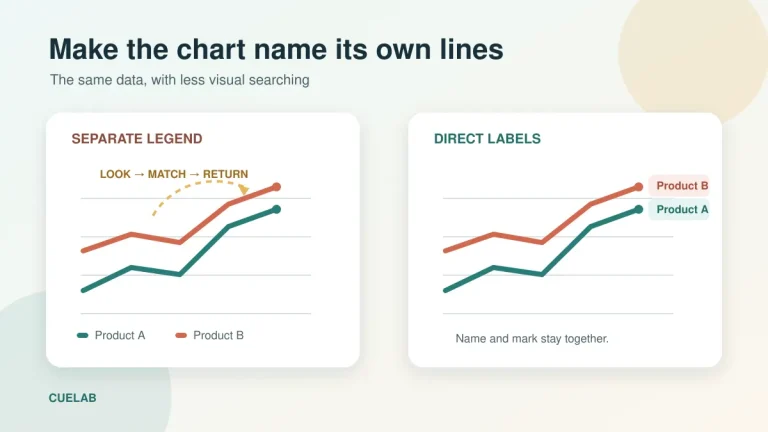
Labels matter here. In a small series, direct labels can reduce trips between the plotted data and a separate legend. CueLab’s guide to direct labels on presentation charts covers situations where that change helps and where it becomes clutter.
Sometimes you need both, but not at the same size
A decision meeting often starts with a pattern and moves toward a precise question. You might first show that requests rose after March, then show the exact monthly counts when someone asks about capacity. This is a sensible reason to prepare both formats.
Give each display a clear role. The main slide can show the pattern, with a few relevant values labeled. The next slide or appendix can provide the table. A shared document can contain the complete data and method for people who need to inspect the calculation later.
If you place a chart and table side by side, make sure there is enough room for both to remain readable on the audience’s actual screen. Two tiny displays do not become accessible simply because they duplicate the same information. You may be better off showing them sequentially.
Explain the transition: “The chart shows the change in level; this table gives the exact counts used in the staffing calculation.” That tells the audience why the second display exists and what they should do with it.
Test the display with a question, not a preference poll
“Which version looks better?” produces design opinions. A task-based check gives you more useful evidence. Show one version to a colleague and ask the question the audience will need to answer. Observe where they look, what they report, and whether they need your help.
For the example, ask “What was the March count?” and “What changed after March?” These questions test different jobs. A version may perform well on one and poorly on the other, which helps you decide whether to change the display or separate the tasks.
Do not turn a check with one colleague into a universal research finding. It is a rehearsal diagnostic. If the colleague has more knowledge than the actual audience, repeat the check with someone closer to the intended reader before drawing a strong conclusion.
Check the slide at the size it will really appear. A chart that is clear on a large editing monitor may be hard to read in a small video-call tile. If you must repeatedly say “You probably can’t read this,” revise the visual before the meeting.
Provide an accessible route to the information
Charts need a text alternative that serves their purpose. W3C’s guidance on complex images describes combining a concise alternative with a fuller description or data table when needed. For our example, the surrounding text states the pattern, and the HTML table supplies every value.
Do not rely on color alone to separate groups. Use labels or other visible distinctions as well. Check contrast and make the important text readable. These choices support people with different visual needs and also help when a projector or compressed video reduces image quality.
When sharing a table digitally, use real table structure with headers instead of only a screenshot. An image may show where the numbers sit, but it does not preserve the row and column relationships in a form a screen reader can reliably use.
During delivery, describe the relevant finding aloud. Saying “You can see what happened” does not help someone who cannot see the chart clearly. “Requests stayed around 120 for three months, then remained around 160 for the next three” communicates the observation without claiming a cause.
Handle units, missing values, and small differences honestly
A format choice cannot repair ambiguous data. If one column is a count and another is a percentage, label them. If a month is missing, distinguish missing data from zero. If the figures come from different definitions or collection periods, explain that before inviting a comparison.
Small differences also deserve care. A table can make a tiny difference look important because the digits differ, while a chart can exaggerate it through a narrow scale. Ask whether the difference matters for the decision and whether uncertainty could change the apparent ordering.
For bar charts, remember that bar length encodes magnitude, so a zero baseline is normally necessary for that comparison to remain faithful. A line chart may use a narrower vertical range to show change, but its scale and context still need to be clear. Refer to the Government Analysis Function’s chart guidance when choosing the implementation.
Where uncertainty is material, keep it visible. A concise table note, an appropriate interval, or a clear spoken qualification may be needed. If you cannot explain the uncertainty responsibly within the slide, provide a fuller source and narrow the claim you make aloud.
A final choice you can defend
Before exporting, write one sentence explaining the choice: “I used a table because the committee needs exact fees and contract dates,” or “I used a line chart because the question is whether demand changed over time.” If your explanation is only “charts are more engaging,” revisit the audience’s task.
Then verify the source, units, period, labels, and data against the original material. Check that the title says no more than the evidence supports. Keep the underlying data available for the person whose next question requires more detail than the slide can hold.
The right format is the one that makes the required comparison clear at the moment it is needed. You can use a chart to introduce a pattern and a table to examine it, while letting each do the job it handles best.
Further reading
Government Analysis Function: Data visualisation—tables
The six-month dataset, diagrams, and presentation scenarios are original illustrative examples. No real organization’s performance is represented.